Process Hacker – A Powerful Windows Task Manager Alternative
September 1, 2009 by Geeks are Sexy | 3 comments
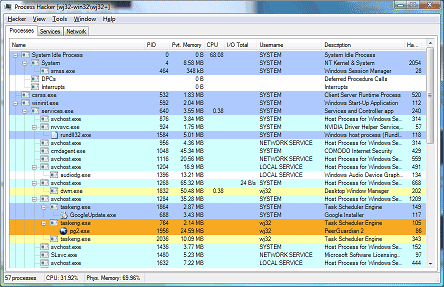
For those of you who find the Windows task manager a little too light on features, we’ve got an awesome little application for you. Process Hacker does the same basic functions as task manager, but with lots of invaluable extras.
Task manager only lists running processes, but Process Hacker allows you to investigate where these processes are coming from (even if they are hidden) and displays helpful graphs and statistics about them. Its kernel-mode driver gives the application the power to terminate, suspend and resume all processes and threads, including those that are usually untouchable by Window’s task manager. And while yes, it may look a bit like Sysinternal’s Process Explorer, we think Process Hacker is a little easier to use. Best of all, it’s an open-source free utility.
[Process Hacker on Sourceforge.net]
- Set up hot keys without any added software on Windows XP or better.
- Free SolarWinds Network Configuration Manager – 30 Day Trial
- HOW TO: Delete an Undeletable or Locked File
- Saturday Evening Fun: Is Your Son a Computer Hacker?
Subscribe by Email


FWIW, I believe that Sysinternal’s Process Explorer is also free.
Free as in beer, not freedom ;)
I’ve used Sysinternal’s Process Explorer for years even after MS bought them and still will. I like the look and the idea it can kill everything, but it comes at a price… it has to be installed on the machine first.
Most times I can barely get the machine running that I’m working on when I need a tool like this the most. If Process Hacker can be made portable, I’m there, but until then, I have to stay with Sysinternal’s Process Explorer.